Throttles List Window
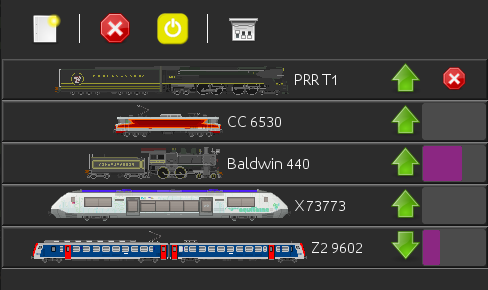
This window is accessible from the
Throttle pane
toolbar.
The Throttles List shows all currently opened Throttles in JMRI, with their respective direction and speed.
Each column represents a different throttle window, with all throttles in that window as rows in that column
Drag'n drop of a throttle from one column to another is supported, the matching throttle frame will be moved from one window to the other
Drag'n drop od roster entrie(s) from the DecoderPro main window is also supported, a throttle for each roster entry will assigned in the matching Throttle Window
If an
icon is available for that roster entry, it will be used.
If large speed sliders are enabled in
Throttles Preferences, speed and direction
will show graphicaly.
Clicking on a line will bring the matching throttle up.
New button
This button creates a new Throttle window (hence different from clicking the "New" button in
Throttle Window toolbar).
Stop button
Will emergency stop all JMRI managed throttles.
Same one as in
Throttle Window toolbar.
Power button
Manage layout power.
Same one as in
Throttle Window toolbar.
Preferences button
Open the
Throttles Preferences pane.
