
JMRI communicates with Märklin Central Station 2/3 and Mobile Station 2 equipment over the Märklin CAN (MCAN) protocol. Connections can use TCP/IP, UDP/IP or a serial interface.
Note: Features available only through the CS2 or CS3 web server APIs are not supported.
Connect directly via TCP/IP or UDP/IP to:
Connect directly via USB to:
For detailed information about the protocol implementation, see the Märklin CAN Protocol Library documentation.
JMRI can connect to a Märklin Command Station 2 using the built in Ethernet interface.
It is possible for multiple PCs to connect to a CS2 using UDP/IP or TCP/IP.
The CS2 uses its own CAN BUS protocol running over the network. When using the UDP protocol, responses from the CS2 are sent out as a broadcast message and therefore the PCs connecting to the CS2 must be in the same IP subnet otherwise the reply messages will not get seen. The TCP protocol connection does not have this limitation.
This implementation of the CS2 CAN protocol was developed and tested on CS2 firmware version 2.
Support for the Märklin CS2 was first available in JMRI 3.1.1. TCP protocol was added in JMRI 5.11.5
Consisting, and Programming are not yet supported.
To configure the connection:
Turnouts, Sensors, Throttle and power support is available for a JMRI-connected CS2 unit.
Throttle support includes the ability to select a specific protocol (Märklin, DCC & mfx)
The MCAN TCP Bridge is a standalone program that allows multiple JMRI instances to share a single CC-Schnitte serial adapter over the network. It bridges MCAN serial adapters to TCP/IP, enabling remote access and multiple concurrent connections.
The standalone marklin-poke tool sends raw MCAN frames to a running bridge.
See the bridge documentation for build instructions and
command-line options.
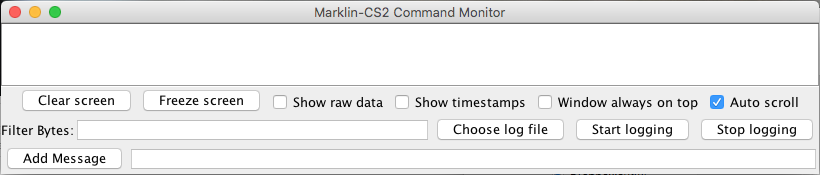
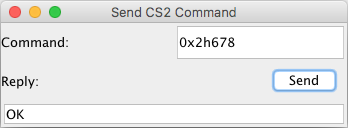
0x4467. Press
[Send] and wait for a reply from the CS2 connection to appear in the Reply field.
The Mobile Station 2 window of the most senior (master) MS2 reads its locomotive list with [Get locos]. Select a Motorola or DCC locomotive and press [Import to roster] to copy it into the JMRI roster. If a roster entry with the same protocol and address already exists, it is updated: Its ID, decoder data and other details are kept. Otherwise a new entry named after the MS2 locomotive is created. Mfx locomotives cannot be imported yet. Their address is a temporary binding which is assigned when the decoder is registered and may change.
Imported entries carry these roster attributes:
MarklinConnection: system prefix of the Märklin connectionMarklinMs2Uid: UID of the MS2 the locomotive was read fromMarklinMs2Name: name shown on the MS2, refreshed on every import. The
roster ID can be longer than the MS2 display allows.For information about the Märklin CAN protocol implementation in JMRI, see the Märklin CAN Protocol Library page.
Since JMRI 5.3.5 JMRI can connect using a CC-Schnitte USB interface.
The CC-Schnitte is a third party USB interface for the Marklin CAN Bus. It is usually directly attached to the 60113 Digital Connector Box, with the MobileStation 2 attached to the second port. In the Marklin system, the Connector Box receives commands from devices attached to the CAN Bus. It acts as a mini booster, but also translates them into a proper DCC/mm2/mfx signal. CC-Schnitte combines with the Connector Box in a fashion similar as the already supported CentralStation 2.
To configure the connection: