LocoNet Slot Monitor
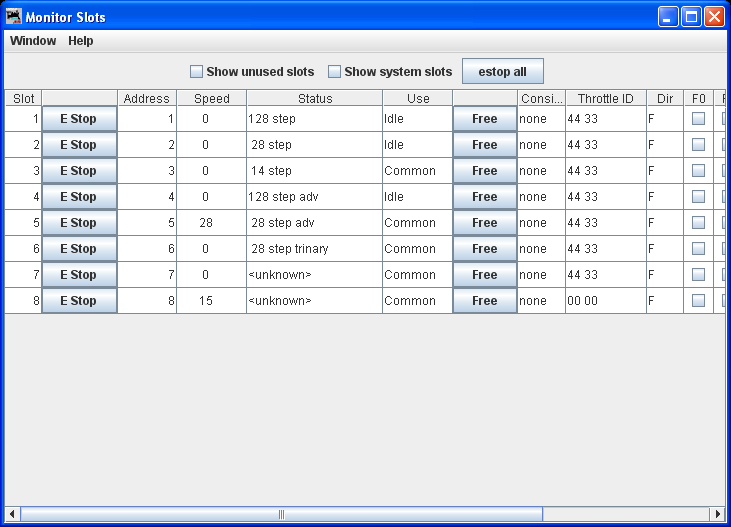
The Slot Monitor tool displays a table of the "command station slots'" contents. Slots are
used to control individual locomotives and consists. The display includes the decoder's speed
step format, current speed and function settings, consist information and status. You can
choose to show either all slots or just the ones being actively used.
The checkboxes at the top allow you to show just the active (in use) slots, or all
locomotive slots. You can also choose whether to show the "system" slots which don't carry
locomotive information.
The "Estop All" button sets the speed of all the locomotives to "Emergency Stop" in one
action.
The "Release all unused slots" button (not visible in this screen shot) will reclaim extra
slots in the Command Station.
Column order may be changed by "Dragging" its heading to the desired position
By right clicking on the header you may Hide or Show columns.
The column order and hidden status is remebered
The columns are:
- Slot
- The number of the slot
- E Stop
- Click this button to set the speed of the decoder to emergency stop
- Address
- The address of the locomotive the slot controls
- Speed
- For unconsisted locomotives and addresses that are the top of a consist, this is the
current speed setting. It's an internal value for consisted slots.
- Status
- The format of the commands being sent to the decoder, typically either 128 step, 28
step, or 14 step, though other values are possible.
- Updated
- The last time that this slot was updated. If proceeded by SS it indicates that the
slot may be purged shortly.
- Use
-
Displays one of four possible states:
- Free
- Not reserved for any particular use, no contents
- Idle
- Not reserved for any particular use, may have contents, if a throttle requests the loco number
in this slot it will be used and set to In-Use, functions settings will not be reset.
- Common
- The Command Station is sending DCC Packets, but there is no throttle refreshing the slot.
- In Use
- Currently controlling a decoder. The Command Station is sending DCC Packets,
and a Throttle is keeping the slot refreshed.
- Free
- Click this button to free the slot, so it can be reused for another locomotive.
- Consisted
- Displays the command station consist status of the slot, whether it's not consisted, the top of a
consist, included in a consist, etc. The number in brackets points to the Slot for the lead loco.
- Consist
- For Command Station consists, shows the consist "Top" address.
-
- Throttle ID
- The ID of the throttle using this slot. It's displayed as two hexadecimal bytes. The
second pair can be configured into the throttle, see the Digitrax instructions.
- Cnt
- If this is a slot with a JMRI throttle (ID normally 02 71) this is the number of JMRI throttles sharing
the slot.
- Direction
- Whether the decoder is currently being commanded to go Forward or Reverse.
- F0-F8,F9-F28
- The current function settings. A check mark indicates a function is On. By default
F9-F28 only show if using XP Protocal.
